# fmt: skip
req_pkg <-
  c("bestNormalize", "discrim", "earth", "embed", "important",
    "kknn", "klaR", "mda", "mirai", "probably", "spatialsample",
    "tidymodels")

# Check to see if they are installed:
pkg_installed <- vapply(req_pkg, rlang::is_installed, logical(1))

# Install missing packages:
if (any(!pkg_installed)) {
  install_list <- names(pkg_installed)[!pkg_installed]
  pak::pak(install_list)
}17 Complex Nonlinear Boundaries
This chapter describes how to use inherently nonlinear models (excluding trees), such as K-nearest neighbors, naive Bayes, and others.
17.1 Requirements
You’ll need 12 packages (bestNormalize, discrim, earth, embed, important, kknn, klaR, mda, mirai, probably, spatialsample, tidymodels) for this chapter:
Let’s load the meta package and manage some between-package function conflicts.
library(tidymodels)
library(spatialsample)
library(embed)
library(bestNormalize)
library(discrim)
library(important)
library(probably)
library(mirai)

tidymodels_prefer()
theme_set(theme_bw() + theme(legend.position = "top"))
daemons(parallel::detectCores())

# Some general settings for tuning classification models:
cls_mtr <- metric_set(brier_class, roc_auc, pr_auc, mn_log_loss)
ctrl_grid <-
  control_grid(
    save_pred = TRUE,
    save_workflow = TRUE,
    parallel_over = "everything"
  )
As before, we’ll load the objects that were already computed for the forestation data:
# "https://raw.githubusercontent.com/aml4td/website/main/RData/forested_data.RData" |>
#   url() |>
#   load()
load("~/content/website/RData/forested_data.RData")
17.2 Nonlinear Discriminants
The tidymodels functions required to use discriminant analysis models are contained in the discrim package. We’ll look at two models from that package.
17.2.1 Naive Bayes
There are 2 engines for the naive_Bayes() function in discrim: klaR and naivebayes. We’ll focus on the first (which is the default engine).
The main text mentioned that removing potentially irrelevant predictors can benefit naive Bayes models. To do this, we’ll use a random forest importance filter to do so. This is accomplished using a recipe with a step from the important package:
filter_rec <-
  recipe(class ~ ., data = forested_train) |>
  step_predictor_best(all_predictors(), score = "imp_rf", prop_terms = tune())
We tune over the proportion of predictors retained using candidate values of 20%, 40%, …, 100%. We’ll also tune the kernel width adjustment parameter, with a value of 1.0 corresponding to the default estimated width. Smaller values result in more distribution peaks, while larger values widen the width, allowing more data to be used to compute the density at each point. We’ll make a regular grid from these two:
nb_wflow <- workflow(filter_rec, naive_Bayes(smoothness = tune(), Laplace = 1))

nb_grid <- crossing(
  smoothness = seq(0.5, 1.5, by = 0.1),
  prop_terms = (1:5 / 5)
)
After this, we’ll resample our models and compute performance for each candidate:
set.seed(872)
forest_nb_res <-
  nb_wflow |>
  tune_grid(
    resamples = forested_rs,
    grid = nb_grid,
    metrics = cls_mtr,
    control = ctrl_grid
  )
We can use the autoplot() method to get a quick assessment of the patterns of performance for the two tuning parameters:
autoplot(forest_nb_res, metric = "brier_class")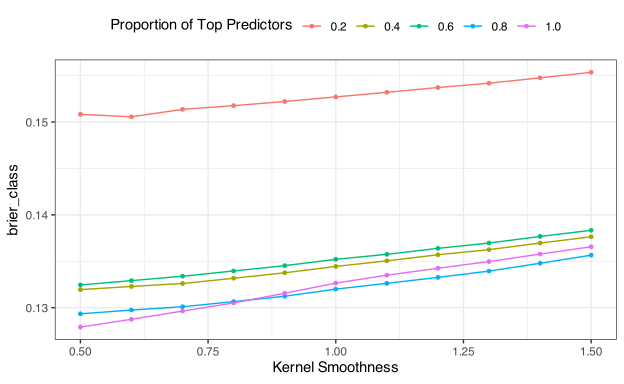
There was some merit in tuning the kernel smoothness parameter; smaller values produce slightly better performance. That is a fairly unusual pattern since a narrow kernel might lead to overfitting the distributions. For the feature selection step, a larger predictor set appears to be favored. However, the price is small for using the entire training set, depending on the smoothness value. We’ll revisit this again in Section 17.3 where the same recipes are used with a different model.
Overall, these results are not as favorable as those from the logistic regression in the previous chapter. We’ll move on from here to the next discriminant model.
17.2.2 Flexible Discriminants
FDA models are a generalization of linear discriminant analysis that enables us to fit our models using techniques more complex than simple linear regression. Almost any regression function can be used with FDA. Our focus will be on using the multivariate adaptive regression spline (MARS) model with FDA; however, other models can also be considered. See the documentation for mda::fda() for more information.
The best implementation of the MARS model is available in the earth package, which is the default in tidymodels. The discrim package contains discrim_flexible() for training these models.
The main function parameters are:
-
num_terms: the number of MARS terms (including the intercept) to keep during training. -
prod_degree: values of 1 or 2 to indicate if interaction pairs should be considered (prod_degree = 2) or if an additive model (prod_degree = 1) will be used. -
prune_method: How should terms be removed? Possible values are:"backward","none","exhaustive","forward","seqrep", or"cv".
One helpful engine-specific parameter is nk. This is the number of initial MARS terms to generate before pruning. By default, this is limited to \(min(200, max(2p))+1\) where \(p\) is the number of predictors. For our data, this default is 34 terms. However, when the training set has “many” rows, we might want to increase this value to encourage the model to potentially produce more complex models. We could tune this parameter to experiment a little more. However, for demonstration, a static value of nk = 201 was set. Here is the code for that specification:
fda_spec <-
  discrim_flexible(
    num_terms = tune(),
    prod_degree = tune(),
    prune_method = tune()
  ) |>
  set_engine("earth", nk = 201)

fda_wflow <- workflow(class ~ ., fda_spec)
For the grid, another regular grid was used that crossed all three parameters. We limit the number of retained terms to 50 and consider forward and backward pruning. The tuning code is otherwise unremarkable:
Another quick visualization tells us what happened:
autoplot(forest_fda_res, metric = "brier_class")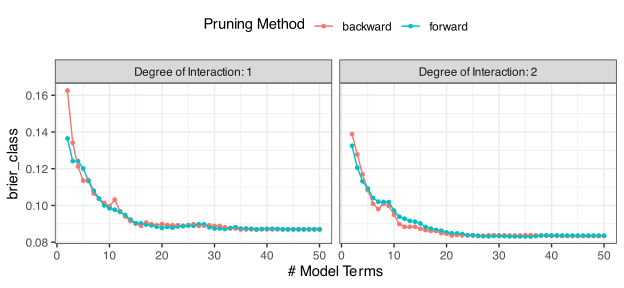
There was a slight benefit to using interaction models. The difference between panels is difficult to see. For interaction models, about 30 terms should be retained (and around 40 for additive models). We can see that the pruning methods yielded very similar Brier scores, but forward selection might be less noisy.
To demonstrate how to visualize predictive profiles for additive models, let’s fit that model to the training set:
fda_fit <-
  fda_wflow |>
  finalize_workflow(
    tibble(
      num_terms = 40,
      prod_degree = 1,
      prune_method = "forward"
    )
  ) |>
  fit(forested_train)
For each predictor, we want to vary its value while holding the others constant. Since the models are additive, the constant could be anything, so we use the median for numeric predictors and the first county value.
We’ll create a vector of names for the numeric predictors and get their constant values (plus the country value):
numeric_pred_nms <- setdiff(names(forested_train), c("class", "county"))
numeric_pred <-
  forested_train |>
  select(all_of(numeric_pred_nms))

median_vals <-
  numeric_pred |>
  map_dbl(median) |>
  tibble::as_tibble_row() |>
  mutate(county = levels(forested_train$county)[1])
We also create a representative grid for each predictor using quantiles (with a maximum grid size of 101):
We create a placeholder object, profiles, to contain all of the results, then loop over the numeric predictor columns to make the prediction set, compute estimated probabilities, and then bind them to the placeholder:
profiles <- NULL

for (i in seq_along(numeric_pred_nms)) {
  pred_nm <- numeric_pred_nms[i]
  static <- median_vals |> select(-all_of(pred_nm))
  var_seq <- col_seqs[[i]]
  var_grid <- crossing(!!pred_nm := var_seq, static)

  grid <-
    augment(fda_fit, new_data = var_grid) |>
    select(.pred_Yes, all_of(pred_nm)) |>
    set_names("Probability", "Value") |>
    mutate(Predictor = pred_nm)

  profiles <- bind_rows(profiles, grid)
}
Now we can create a plot of profiles:
profiles |>
  ggplot(aes(Value, Probability)) +
  geom_line() +
  facet_wrap(~Predictor, scale = "free") +
  # Since the y-axis values are meaningless for this visualization, we remove it:
  theme(axis.text.y = element_blank())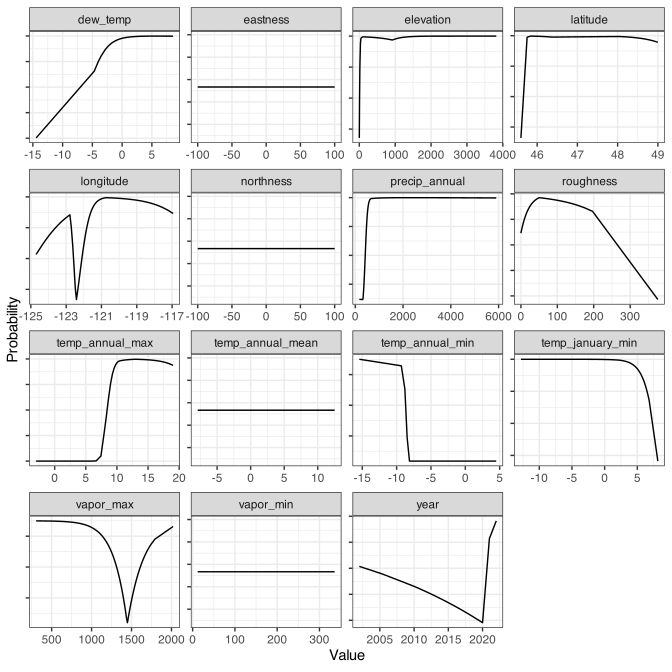
The flat profiles indicate that the predictor was never used in the model.
Keep in mind that the y-axis for these profiles is relative probability. Their actual values are linear combinations that can’t be displayed in the same visualization.
17.3 K-Nearest Neighbors
The KNN model is fit using the parsnip function nearest_neighbor(). It has a single engine (kknn") with main parameters:
-
neighbors(): an integer for the number of nearest neighbors. -
weight_func(): a character value for the kernel functions to apply to distances (e.g.,"rectangular"). Possible values are contained in the vectordials::values_weight_func. -
dist_power(): a numeric value for the exponent in the Minkowski distance.
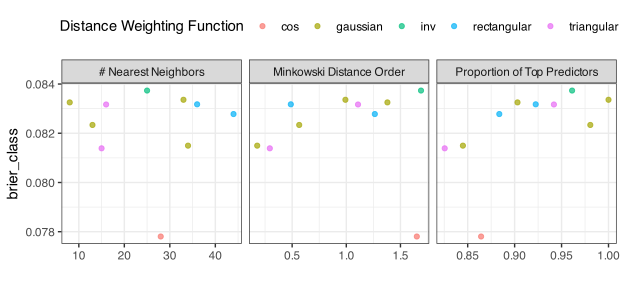
For preprocessing, the predictions should all be numeric and have the same scale/units. Removing irrelevant predictors is also a good idea, as evidenced by FIGURE.
We’ll recycle the recipes from Section 17.2.1 that used a random forest importance filter to screen the predictor set and add an orderNorm transformation to put the predictors on the same symmetric scale. From there, we’ll write a model specification and tag all three parameters for tuning:
knn_spec <-
  nearest_neighbor(
    neighbors = tune(),
    dist_power = tune(),
    weight_func = tune()
  ) |>
  set_mode("classification")

encode_and_filter_rec <-
  filter_rec |>
  step_lencode_mixed(county, outcome = "class") |>
  step_orderNorm(all_numeric_predictors())

knn_wflow <- workflow(encode_and_filter_rec, knn_spec)
For a grid, we’ll set the range of neighbors to 50 locations, and use five different kernel weighting functions:
kern_vals <- c("rectangular", "triangular", "cos", "gaussian", "inv")

knn_param <-
  knn_wflow |>
  extract_parameter_set_dials() |>
  update(
    neighbors = neighbors(c(2, 50)),
    weight_func = weight_func(kern_vals)
  )
Now we tune the model with the familiar syntax:
set.seed(872)
forest_knn_res <-
  knn_wflow |>
  tune_grid(
    resamples = forested_rs,
    grid = 50,
    param_info = knn_param,
    metrics = cls_mtr,
    control = ctrl_grid
  )
Once again, autoplot() is used to discover how each parameter affects model performance:
autoplot(forest_knn_res, metric = "brier_class")