# fmt: skip
req_pkg <- c("bestNormalize", "important", "mirai", "janitor", "kernlab", "partykit",
             "QSARdata", "ranger", "rpart", "tidymodels")

# Check to see if they are installed:
pkg_installed <- vapply(req_pkg, rlang::is_installed, logical(1))

# Install missing packages:
if (any(!pkg_installed)) {
  install_list <- names(pkg_installed)[!pkg_installed]
  pak::pak(install_list)
}13 Feature Selection
The book’s Feature Selection chapter focuses on different methods to reduce the number of predictors used by the model
13.1 Requirements
We will use the following package in this chapter: You’ll need 10 packages (bestNormalize, important, janitor, kernlab, mirai, partykit, QSARdata, ranger, rpart, and tidymodels) for this chapter. You can install them via:. To install them:
We’ll demonstrate these tools using the phospholipidosis (PLD) data set from the QSARdata package. These data are an example of a data set used in drug discovery to help predict when compounds have unwanted side effects (e.g., toxicity).
We’ll consider two predictor sets. One consists of a series of descriptors of molecules (such as size or weight) and a set of predictors that are binary indicators for important sub-structures in the equations that make up the molecules. The response has two classes (“clean” and toxic outcomes).
Even before initial splitting, there are more predictors (1345) than data points (324), making feature selection an essential task for these data.
Let’s load the meta package, manage some between-package function conflicts, and initialize parallel processing:
library(tidymodels)
library(important)
library(bestNormalize)
library(mirai)
library(janitor)
library(mirai)

tidymodels_prefer()
theme_set(theme_bw())
daemons(parallel::detectCores())
There are a few different data frames for these data. We’ll merge two and clean up and shorten the variable names, use a 4:1 split of the data, and then initialize multiple repeats of 10-fold cross-validation:
data(PLD, package = "QSARdata")

drug_data <-
  # Merge the outcome data with a subset of possible predictors.
  PLD_Outcome |>
  full_join(PLD_VolSurfPlus, by = "Molecule") |>
  full_join(
    PLD_PipelinePilot_FP |> select(1, contains("FCFP")),
    by = "Molecule"
  ) |>
  select(-Molecule) |>
  clean_names() |>
  as_tibble() |>
  # Make shorter names:
  rename_with(~ gsub("vol_surf_plus_", "", .x), everything()) |>
  rename_with(~ gsub("ppfp_fcfp_", "fp_", .x), everything())

set.seed(106)
drug_split <- initial_split(drug_data, prop = 0.8, strata = class)
drug_train <- training(drug_split)
drug_test <- testing(drug_split)
drug_rs <- vfold_cv(drug_train, repeats = 10, strata = class)
There is a class imbalance for these data:
dim(drug_train)
#> [1]  259 1346
drug_train |> count(class)
#> # A tibble: 2 × 2
#>   class          n
#>   <fct>      <int>
#> 1 inducer       99
#> 2 noninducer   160
The level “inducer” indicates that the molecule has been proven to cause phospholipidosis.
13.2 Unsupervised Selection
In tidymodels, most preprocessing methods for feature selection are recipe steps.
There are several unsupervised feature filters in recipes:
-
step_zv(): Removes predictors with a single value. -
step_nzv(freq_cut = double(1), unique_cut = double(1)): Removes predictors that have a few unique values that are out of the mainstream. -
step_corr(threshold = double(1)): Reduces the pairwise correlations between predictors. -
step_lincomb(): Eliminates strict linear dependencies between predictors. -
step_filter_missing(threshold = double(1)): Remove predictors that have too many missing values.
The textrecipes package also has a few unsupervised methods for screening tokens (i.e., words):
-
step_tokenfilter(): filter tokens based on term frequency. -
step_stopwords(): Removes top words (e.g., “and”, “or”, etc.) -
step_pos_filter(): Part of speech filtering of tokens.
It is suggested that these steps occur early in a recipe, perhaps after any imputation methods.
We suggest adding these to a recipe early, after any imputation methods.
For the drug toxicity data, we can visualize the amount of predictor correlations by first computing the correlation matrix:
cor_mat <-
  drug_train |>
  select(-class) |>
  cor()
#> Warning in cor(select(drug_train, -class)): the standard deviation is zero
Note the warning: some columns have a single unique value. Let’s look at this across the entire set of predictors via a function in the vctrs package:
num_unique <- map_int(drug_train |> select(-class), vctrs::vec_unique_count)
names(num_unique)[num_unique == 1]
#>  [1] "fp_0167" "fp_0172" "fp_0174" "fp_0178" "fp_0181" "fp_0182" "fp_0183" "fp_0191"
#>  [9] "fp_0193" "fp_0195" "fp_0198" "fp_0200" "fp_0204" "fp_0205" "fp_0206" "fp_0212"
We’ll start a recipe with the step that will eliminate these:
drug_rec <-
  recipe(class ~ ., data = drug_train) |>
  step_zv(all_predictors())
Returning to correlations, let’s plot the distribution of pairwise correlation between predictors:
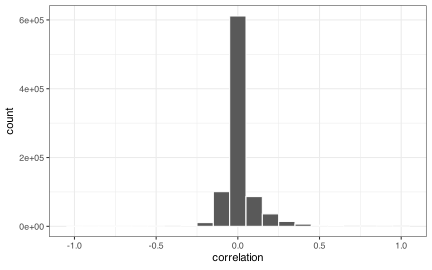
This isn’t too bad, but if we wanted to reduce the extreme pairwise correlations, we could use:
drug_rec |>
  step_corr(all_predictors(), threshold = 0.75)
#>
#> ── Recipe ───────────────────────────────────────────────────────────────────────────
#>
#> ── Inputs
#> Number of variables by role
#> outcome:      1
#> predictor: 1345
#>
#> ── Operations
#> • Zero variance filter on: all_predictors()
#> • Correlation filter on: all_predictors()
or search for an optimal cutoff using threshold = tune() (as we will below).
13.3 Automatic Selection
The text mentioned that there are types of models that automatically select predictors. Tree-based models typically fall into this category.
To demonstrate, let’s fit a Classification and Regression Tree (CART) to the training set and see how many predictors are removed.
Before doing so, let’s turn off a feature of this model. CART computes special alternate splits during training (“surrogate” and “competing” splits) to aid with things like missing value imputation. We’ll use the built-in feature importance measure to see how many predictors were used. Unfortunately, those measures will include splits not actually used by the model, so we prohibit these from being listed using rpart.control().
We can pass that to the model fit when we set the engine:
cart_ctrl <- rpart::rpart.control(maxcompete = 0, maxsurrogate = 0)

cart_spec <-
  decision_tree(mode = "classification") |>
  set_engine("rpart", control = !!cart_ctrl)
Note the use of !! (“bang-bang”) when adding cart_ctrl as an engine option. If we had just used control = cart_ctrl, it tells R to look for a reference to object “cart_ctrl”, which resides in the global environment. Ordinarily, that works fine. However, if we use parallel processing, that reference is not available to the worker processes, and an error will occur.
Using the bang-bang operator, we replace the reference to “cart_ctrl” with the actual value of that object. It splices the actual data into the model specification so parallel workers can find it. Here’s the model fit:
cart_drug_fit <- cart_spec |> fit(class ~ ., data = drug_train)
cart_drug_fit
#> parsnip model object
#>
#> n= 259
#>
#> node), split, n, loss, yval, (yprob)
#>       * denotes terminal node
#>
#>  1) root 259 99 noninducer (0.38224 0.61776)
#>    2) l1lg_s< -2.105 103 30 inducer (0.70874 0.29126)
#>      4) logp_c_hex>=1.023 70 10 inducer (0.85714 0.14286)
#>        8) cw7< 0.01674 41  1 inducer (0.97561 0.02439) *
#>        9) cw7>=0.01674 29  9 inducer (0.68966 0.31034)
#>         18) w6>=33.5 13  0 inducer (1.00000 0.00000) *
#>         19) w6< 33.5 16  7 noninducer (0.43750 0.56250) *
#>      5) logp_c_hex< 1.023 33 13 noninducer (0.39394 0.60606)
#>       10) fp_0048>=0.5 9  0 inducer (1.00000 0.00000) *
#>       11) fp_0048< 0.5 24  4 noninducer (0.16667 0.83333)
#>         22) d8>=4.5 7  3 inducer (0.57143 0.42857) *
#>         23) d8< 4.5 17  0 noninducer (0.00000 1.00000) *
#>    3) l1lg_s>=-2.105 156 26 noninducer (0.16667 0.83333)
#>      6) cw7< 0.002635 9  3 inducer (0.66667 0.33333) *
#>      7) cw7>=0.002635 147 20 noninducer (0.13605 0.86395)
#>       14) vd>=0.4691 8  3 inducer (0.62500 0.37500) *
#>       15) vd< 0.4691 139 15 noninducer (0.10791 0.89209) *
Of the 1345 predictors, only 7 were actually part of the prediction equations. The partykit package has a nice plot method to visualize the tree:
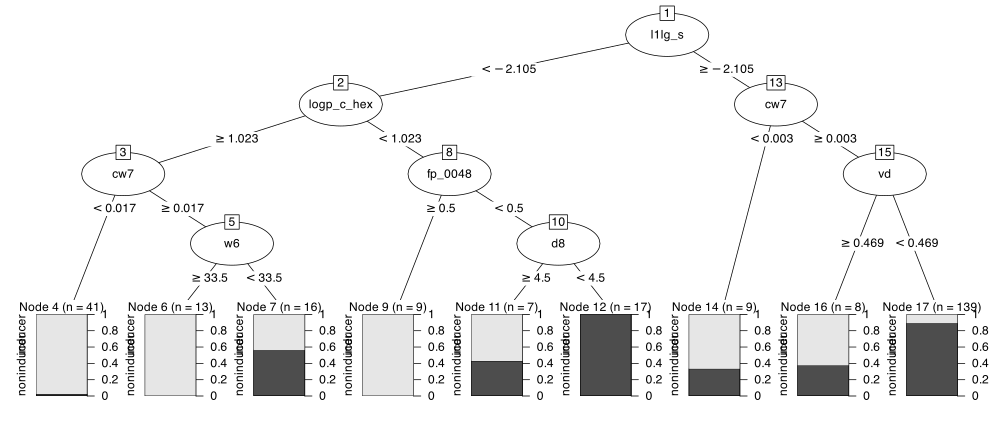
As previously mentioned, trees produced by the rpart package have an internal importance score. To return this, let’s write a small function to pull the rpart object out, extract the importance scores, and then return a data frame with that data:
get_active_features <- function(x) {
  require(tidymodels)
  x |>
    extract_fit_engine() |>
    pluck("variable.importance") |>
    tibble::enframe() |>
    setNames(c("predictor", "importance"))
}

get_active_features(cart_drug_fit)
#> # A tibble: 7 × 2
#>   predictor  importance
#>   <chr>           <dbl>
#> 1 l1lg_s         36.46
#> 2 logp_c_hex      9.624
#> 3 fp_0048         9.091
#> 4 cw7             7.553
#> 5 w6              4.539
#> 6 vd              4.045
#> # ℹ 1 more row
This shows us the 7 predictors used, along with their relative effect on the model.
These results show what happens with the training set, but would a predictor like l1lg_s be consistently selected?
To determine this, we can resample the model and save the importance scores for each of the 100 analysis sets. Let’s take the get_active_features() function and add it to a different control function that will be executed during resampling:
ctrl <- control_resamples(extract = get_active_features)
cart_drug_res <-
  cart_spec |>
  fit_resamples(
    class ~ .,
    resamples = drug_rs,
    control = ctrl
  )
Our results will have an extra column called .extract that contains the results for the resample. Since we didn’t tune this model, .extract contains a simple tibble with the results:
cart_drug_res$.extracts[[1]]
#> # A tibble: 1 × 2
#>   .extracts        .config
#>   <list>           <chr>
#> 1 <tibble [7 × 2]> pre0_mod0_post0

cart_drug_res$.extracts[[1]]$.extracts
#> [[1]]
#> # A tibble: 7 × 2
#>   predictor  importance
#>   <chr>           <dbl>
#> 1 vd             35.40
#> 2 logp_c_hex      9.001
#> 3 l1lg_s          7.934
#> 4 aus74           3.75
#> 5 cw1             3.438
#> 6 fp_0027         3.048
#> # ℹ 1 more row
We can extract the results from all the resamples, unnest, and count the number of times each predictor was selected:
resampled_selection <-
  cart_drug_res |>
  collect_extracts() |>
  unnest(.extracts) |>
  count(predictor) |>
  arrange(desc(n))

resampled_selection |> slice_head(n = 5)
#> # A tibble: 5 × 2
#>   predictor      n
#>   <chr>      <int>
#> 1 l1lg_s        86
#> 2 vd            58
#> 3 logp_c_hex    56
#> 4 cw7           44
#> 5 iw4           43
A visualization illustrates that a small number of predictors were reliably selected:
resampled_selection |>
  ggplot(aes(n)) +
  geom_histogram(binwidth = 2, col = "white") +
  labs(x = "# Times Selected (of 100)")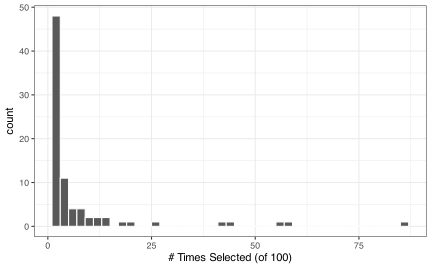
We can also see the model’s performance characteristics:
collect_metrics(cart_drug_res)
#> # A tibble: 3 × 6
#>   .metric     .estimator   mean     n  std_err .config
#>   <chr>       <chr>       <dbl> <int>    <dbl> <chr>
#> 1 accuracy    binary     0.7402   100 0.007001 pre0_mod0_post0
#> 2 brier_class binary     0.2002   100 0.005294 pre0_mod0_post0
#> 3 roc_auc     binary     0.7548   100 0.008063 pre0_mod0_post0
One additional note about using tree-based models to automatically select predictors. Many tree ensembles create a collection of individual tree models. For ensembles to work well, this collection should have a diverse set of trees (rather than those with the same splits). To encourage diversity, many tree models have an mtry parameter. This parameter is an integer for the number of predictors in the data set that should be randomly selected when making a split. For example, if mtry = 3, a different random selection of three predictors would be the only ones considered for each split in the tree. This facilitates diversity but also forces irrelevant predictors to be included in the model.
However, this also means that many tree ensembles will have prediction functions that include predictors that have no effect. If we take the same strategy as above, we will vastly overestimate the number of predictors that affect the model.
For this reason, we might consider setting mtry to use the complete predictor set during splitting if we are trying to select predictors. While this might slightly decrease the model’s performance, the false positive rate of finding “important predictors” will be significantly reduced.
13.4 Wrapper Methods
tidymodels does not contain any wrapper methods, primarily due to their computational costs.
Several other packages do, most notably caret. For more information on what that package can do, see the feature selection chapters of the documentation:
- Feature Selection Overview
- Feature Selection using Univariate Filters
- Recursive Feature Elimination
- Feature Selection using Genetic Algorithms
- Feature Selection using Simulated Annealing
R code from the Feature Engineering and Selection book can also be found at https://github.com/topepo/FES.
13.5 Filter Methods
The important package has three recipe steps for supervised feature selection. These tools can use one or more scores to determine which predictors to retain in the model. We’ll use it below, but see the documentation here for more details. The colino package also has a variety of recipe feature filter steps that can be used (found on GitHub here).
We’ll focus on using a basic random forest permutation importance as a scoring mechanism. We’ll still use the unsupervised correlation filters before the supervised analysis. important::step_predictor_best() requires a score argument to specify the ranking mechanism. Possible values are listed in the manual page for the function. For our instance, we’ll use score = "imp_rf". You can also specify the proportion of features to retain via the prop_terms argument. The default tuning range is [5%, 100%], which we’ll use. The code is:
drug_rec <-
  recipe(class ~ ., data = drug_train) |>
  step_zv(all_predictors(), id = "zv") |>
  step_corr(all_numeric_predictors(), threshold = tune(), id = "cor") |>
  step_predictor_best(
    all_predictors(),
    score = "imp_rf",
    prop_terms = tune(),
    id = "vip"
  ) |>
  step_orderNorm(all_numeric_predictors())
Note that we also add a correlation filter and optimize the exclusion threshold. This helps the random forest model since the inclusion of highly correlated predictors can dilute the importance of the set of related predictors.
We’ll fit a support vector machine model to these data, so the recipe concludes with a step that will normalize the features to have the same distribution (even the binary values).
Now we can specify the supervised model, tag two parameters for optimization, and then add the model and recipe to a workflow:
svm_spec <-
  svm_rbf(cost = tune(), rbf_sigma = tune()) |>
  set_mode("classification")

vip_svm_wflow <- workflow(drug_rec, svm_spec)
Let’s adjust the range of the correlation filter to make it slightly more aggressively remove highly correlated predictors:
vip_svm_param <-
  vip_svm_wflow |>
  extract_parameter_set_dials() |>
  update(
    threshold = threshold(c(0.25, 0.99))
)Finally, let’s tune the model via Bayesian optimization and use the Brier score to guide the process to the best values of the tuning parameters. This is a long computation; lowering the value of iter will make it finish more quickly.
ctrl <- control_bayes(parallel_over = "everything")

set.seed(1487)
vip_svm_res <-
  vip_svm_wflow |>
  tune_bayes(
    resamples = drug_rs,
    metrics = metric_set(brier_class, roc_auc),
    initial = 4,
    iter = 15,
    control = ctrl,
    param_info = vip_svm_param
  )
#> ! There are 4 tuning parameters and 4 grid points were requested.
#> • This is likely to cause numerical issues in the first few search iterations.
Keep in mind that the kernlab implementation of SVMs for classification uses its own random number generator and not the one in base R. This will probably yield different results when run again.
A visualization of the process shows that the search does reduce the Brier score during the search:
autoplot(vip_svm_res, metric = "brier_class", type = "performance")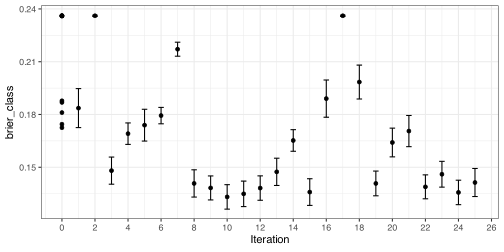
We can plot the parameter choices over iterations:
autoplot(vip_svm_res, type = "parameters")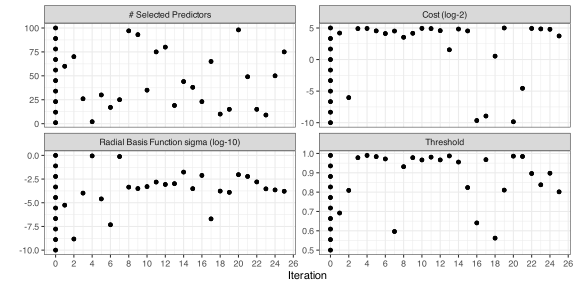
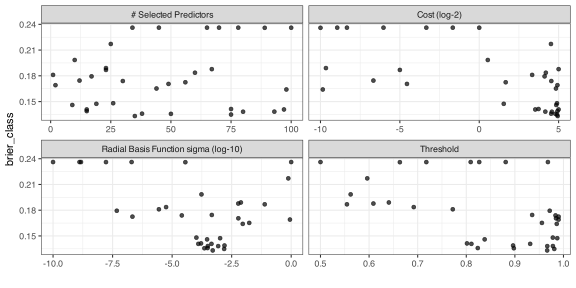
A plot of the filtering parameter values versus the Brier score tells a similar story:
vip_svm_res |>
  collect_metrics() |>
  filter(.metric == "brier_class") |>
  rename(Brier = mean) |>
  ggplot(aes(threshold, prop_terms, size = Brier, col = Brier)) +
  geom_point(alpha = 2 / 4) +
  coord_fixed(ratio = (0.99 - 0.25) / (0.99 - 0.05)) +
  labs(
    x = "Correlation Filter Threshold",
    y = "Proportion of Predictors Kept"
  )
The numerically best results are:
show_best(vip_svm_res, metric = "brier_class")
#> # A tibble: 5 × 11
#>       cost  rbf_sigma threshold prop_terms .metric  .estimator   mean     n  std_err
#>      <dbl>      <dbl>     <dbl>      <dbl> <chr>    <chr>       <dbl> <int>    <dbl>
#> 1 0.07978  0.0004459     0.9860     0.9775 brier_c… binary     0.1548   100 0.004108
#> 2 0.05979  0.00008177    0.9829     0.9946 brier_c… binary     0.1556   100 0.004265
#> 3 0.06166  0.00001228    0.9741     0.9599 brier_c… binary     0.1557   100 0.004347
#> 4 0.002546 0.0004536     0.8746     0.9721 brier_c… binary     0.1562   100 0.004031
#> 5 0.001949 0.001809      0.9769     0.9969 brier_c… binary     0.1571   100 0.003550
#> # ℹ 2 more variables: .config <chr>, .iter <int>

best_param <- select_best(vip_svm_res, metric = "brier_class")
Let’s update our workflow with the best parameters, then fit the final model on the entire training set:
set.seed(124)
final_model <-
  vip_svm_wflow |>
  finalize_workflow(best_param) |>
  fit(drug_train)
final_model
#> ══ Workflow [trained] ═══════════════════════════════════════════════════════════════
#> Preprocessor: Recipe
#> Model: svm_rbf()
#>
#> ── Preprocessor ─────────────────────────────────────────────────────────────────────
#> 4 Recipe Steps
#>
#> • step_zv()
#> • step_corr()
#> • step_predictor_best()
#> • step_orderNorm()
#>
#> ── Model ────────────────────────────────────────────────────────────────────────────
#> Support Vector Machine object of class "ksvm"
#>
#> SV type: C-svc  (classification)
#>  parameter : cost C = 0.0797839123868838
#>
#> Gaussian Radial Basis kernel function.
#>  Hyperparameter : sigma =  0.000445862578095906
#>
#> Number of Support Vectors : 220
#>
#> Objective Function Value : -15.3
#> Training error : 0.382239
#> Probability model included.
How many predictors were removed, and how many made it to the final model? We can write a function to use the tidy() method on the recipe steps to assess what was eliminated. The “mold” for the workflow can also tell us how many predictors were passed to the SVM model:
get_filter_info <- function(x) {
  fit_rec <- extract_recipe(x)
  # The tidy methods show the predictors that were eliminated:
  corr_filter <- nrow(tidy(fit_rec, id = "cor"))
  zv_filter <- nrow(tidy(fit_rec, id = "zv"))
  vip_filter <- sum(tidy(fit_rec, id = "vip")$removed)
  original <- ncol(drug_train) - 1

  # The mold has a 'predictors' element that describes the
  # columns which are given to the model:
  retained <-
    x |>
    extract_mold() |>
    pluck("predictors") |>
    ncol()
  # We'll save them as a tibble:
  tibble(original, zv_filter, corr_filter, vip_filter, retained)
}

get_filter_info(final_model)
#> # A tibble: 1 × 5
#>   original zv_filter corr_filter vip_filter retained
#>      <dbl>     <int>       <int>      <int>    <int>
#> 1     1345        16         659         16      654
The correlation filter removes a large number of predictors, which is not surprising for this type of data set.
How does the model work on the test set of 65 molecules?
test_pred <- augment(final_model, drug_test)
test_pred |> brier_class(class, .pred_inducer)
#> # A tibble: 1 × 3
#>   .metric     .estimator .estimate
#>   <chr>       <chr>          <dbl>
#> 1 brier_class binary        0.1368
test_pred |> roc_auc(class, .pred_inducer)
#> # A tibble: 1 × 3
#>   .metric .estimator .estimate
#>   <chr>   <chr>          <dbl>
#> 1 roc_auc binary         0.908